The 20-Minute Eye Enhancement Workflow That Makes Portraits Feel Alive

The 20-Minute Eye Enhancement Workflow That Makes Portraits Feel Alive

A few years back, a client emailed me after receiving her finished gallery. She loved everything, she said, except one thing: her eyes looked “like a doll’s.” Not a compliment. I went back to the file and stared at what I’d done. The whites were blown out to pure paper, the irises had been saturated to an almost cartoon blue, and the catch lights had been cloned into perfect symmetrical circles.

The 20-Minute Eye Enhancement Workflow That Stopped Making My Portraits Look Fake

The 20-Minute Eye Enhancement Workflow That Stopped Making My Portraits Look Fake

A few years into freelancing, I had a client sit across from me at a coffee shop, laptop open, and say the words every retoucher dreads: “She looks like a doll. Not in a good way.” The portrait was technically clean. Skin was smooth, the background was polished, the color grade was consistent. But the eyes, which I had spent probably forty minutes on, looked like they’d been swapped in from a video game character.

The Art of Natural Hair Retouching: A Step-by-Step Guide

The Art of Natural Hair Retouching: A Step-by-Step Guide

The Art of Natural Hair Retouching: A Step-by-Step Guide Hair retouching intimidates a lot of editors when they’re starting out. I get it—hair is complex, with thousands of individual strands that can catch light unpredictably. But I want to assure you that with the right approach, hair retouching becomes one of the most satisfying parts of portrait editing. Over the years, I’ve developed a workflow that keeps things looking natural while fixing the real problems that plague hair in photography.

Frequency Separation: The Game-Changing Technique for Flawless Skin

Frequency Separation: The Game-Changing Technique for Flawless Skin

Frequency Separation: The Game-Changing Technique for Flawless Skin When I first discovered frequency separation, it transformed how I approach portrait retouching. This technique gives us something that traditional healing brushes simply can’t: the ability to edit skin texture and color independently. If you’ve ever struggled to smooth skin without making it look plastic, or found yourself fighting with color corrections that affect sharpness, this method is about to become your best friend.

The Art of Eye Enhancement: Techniques That Bring Portraits to Life

The Art of Eye Enhancement: Techniques That Bring Portraits to Life

The Art of Eye Enhancement: Techniques That Bring Eyes to Life When I’m editing a portrait, I always start by looking into the eyes. They’re the first thing viewers connect with, and they’re often the difference between a good portrait and one that truly captivates. Whether you’re working with professional headshots or fashion editorials, enhancing the eyes properly can transform your entire image. Let me walk you through the approach I’ve developed over years of retouching—one that respects the natural beauty of the subject while making their eyes unforgettable.

The Art of Subtle Makeup Retouching: Enhancing Without Overdoing

The Art of Subtle Makeup Retouching: Enhancing Without Overdoing

The Art of Subtle Makeup Retouching: Enhancing Without Overdoing I’ve spent years perfecting the balance between enhancement and authenticity in portrait retouching, and I’ve learned that the most stunning results often come from restraint. Makeup retouching isn’t about creating an artificial face—it’s about helping your subject look like the best version of themselves. Let me walk you through my approach to makeup retouching that respects the original while elevating the final image.

Frequency Separation: The Game-Changing Technique That Transformed My Portrait Editing

Frequency Separation: The Game-Changing Technique That Transformed My Portrait Editing

Frequency Separation: The Game-Changing Technique That Transformed My Portrait Editing When I first learned about frequency separation, I’ll be honest—it felt intimidating. The name alone made me hesitant. But once I understood what was actually happening, it became the foundation of how I approach every single portrait that comes across my desk. Today, I want to walk you through this technique because I genuinely believe it will change the way you retouch.

The Art of Subtle Makeup Retouching: Enhancing Beauty Without Looking Overdone

The Art of Subtle Makeup Retouching: Enhancing Beauty Without Looking Overdone

The Art of Subtle Makeup Retouching: Enhancing Beauty Without Looking Overdone When I first started retouching portraits, I made the same mistake many of us do: I over-edited. Every blemish disappeared. Every shadow vanished. The results looked plastic and lifeless. Over the years, I’ve learned that the best makeup retouching isn’t about perfection—it’s about enhancement. It’s about making someone look like the best version of themselves, not a filtered version of themselves.

Frequency Separation: The Game-Changing Technique Every Portrait Retoucher Needs to Master

Frequency Separation: The Game-Changing Technique Every Portrait Retoucher Needs to Master

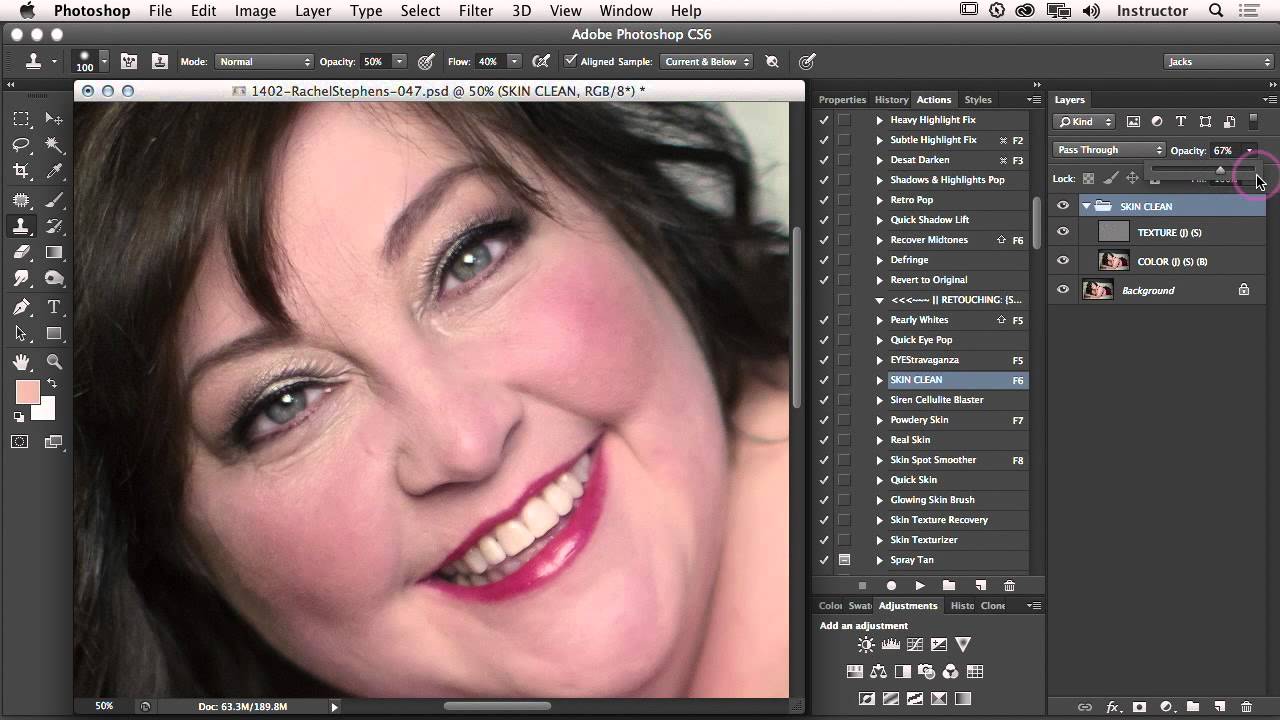
Frequency Separation: The Game-Changing Technique Every Portrait Retoucher Needs to Master When I first discovered frequency separation, I felt like I’d unlocked a secret level in portrait retouching. This technique changed everything about how I approach skin editing—and I’m excited to share it with you because it genuinely transforms your results. Frequency separation works by splitting an image into two layers: one containing color and tone information, and another containing texture and detail.

The Art of Skin Retouching: Achieving Natural Results Without the Filter Look

The Art of Skin Retouching: Achieving Natural Results Without the Filter Look

The Art of Skin Retouching: Achieving Natural Results Without the Filter Look When I started my retouching journey, I made the same mistake many of us do: I smoothed skin until it looked like porcelain. It wasn’t until a client gently asked, “Is that really me?” that I realized the difference between enhancement and erasure. Skin retouching is about revealing the best version of someone’s natural skin—not creating an impossible standard.

Frequency Separation Mastery: The Game-Changing Technique for Flawless Skin Retouching

Frequency Separation Mastery: The Game-Changing Technique for Flawless Skin Retouching

Frequency Separation Mastery: The Game-Changing Technique for Flawless Skin Retouching When I first discovered frequency separation, I felt like I’d unlocked a secret level in portrait retouching. This technique changed everything about how I approach skin editing—and I’m excited to share it with you today. If you’ve ever struggled with over-smoothed skin that looks plastic, or spent hours trying to remove a blemish without destroying texture, frequency separation is your answer.

The Art of Subtle Skin Retouching: Keeping Your Portraits Natural

The Art of Subtle Skin Retouching: Keeping Your Portraits Natural

The Art of Subtle Skin Retouching: Keeping Your Portraits Natural When I first started retouching portraits, I made the same mistake most of us do: I went too far. Every portrait looked flawless in an uncanny way—poreless, featureless, and frankly, not quite human. It took years for me to understand that the best skin retouching isn’t about creating perfection. It’s about creating confidence. The goal we’re aiming for is simple: enhance what’s already beautiful while preserving the character, texture, and authenticity that makes a portrait compelling.